


PSP Travel Case
PSP Travel Case
Couldn't load pickup availability
-

This was supposed to be a gift for my husband, but I ended up playing it more than he does. We connected it to the TV and have been playing together in the evenings. Setup was pretty straightforward and everything worked right away.
-

My kids were excited when they saw it, but I think I was even more excited. We've been playing it together on the TV and it has been such a fun way to spend time together. Definitely brings back memories.
-

I immediately searched for some of my old favorites and found them. Then I spent another hour just scrolling through everything else. Really happy with this purchase.


PSP Travel Case
Throw it in your bag and stop worrying.
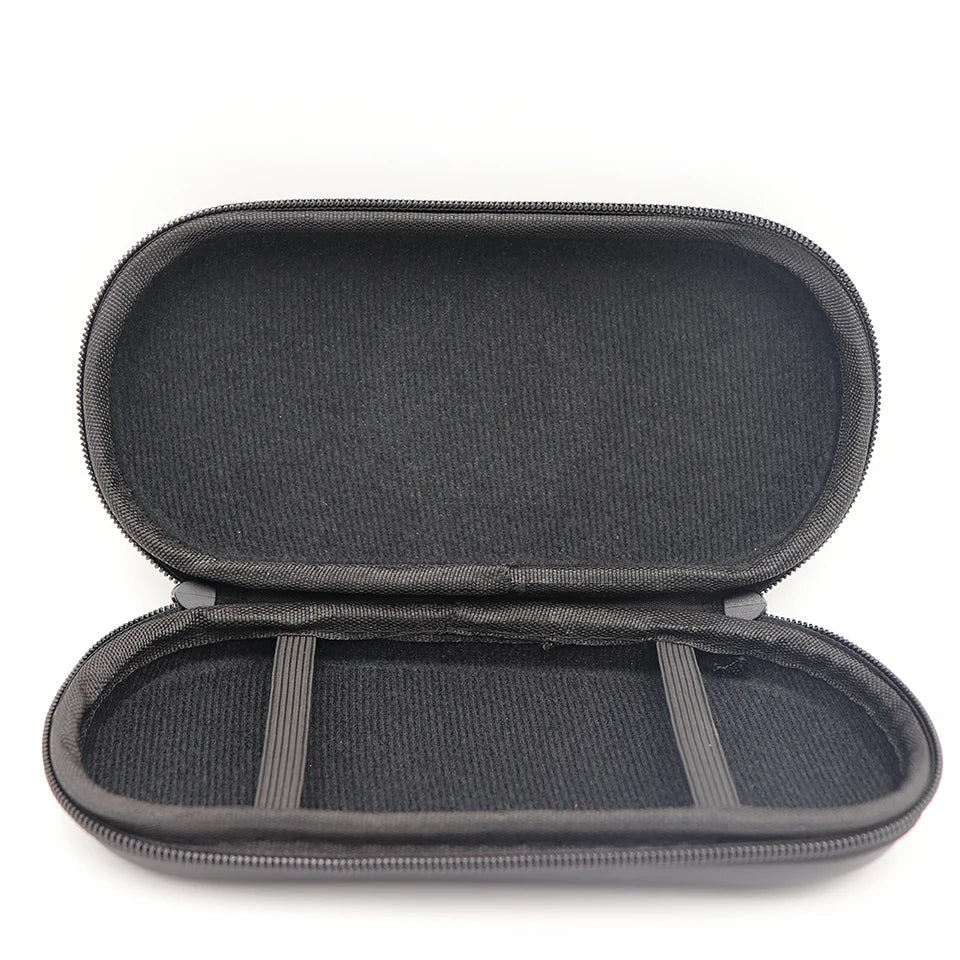
A hard-shell zip case cut to fit the PSP 3000 exactly. Soft lining inside so the screen doesn't get scratched, elastic strap to hold the console still, and a mesh pocket for your charger and memory cards.
- Rigid shell — survives being crushed at the bottom of a tote
- Soft inner lining, no screen scratches
- Elastic console strap + mesh accessory pocket
- Smooth zip that won't catch
If your PSP leaves the house, it should leave in this.




ONE MENU
70+ consoles, already set up
You never download an emulator, pick a core, or map a single button. Every system is installed and sorted, with box art.

YOUR LIBRARY
100,000+ games, sorted by console
Pick something and play instead of scrolling filenames. Add or delete whatever you like — it's yours.

PLUGS INTO WHAT YOU OWN
Your laptop, or your TV
No dock, no adapter, no second device to buy. Windows, Mac and Linux.
A few of the systems inside


One little console, or a shelf of them
What it would actually take to play all of this the other way.
| PlayHer | Buying a Switch 2 | |
|---|---|---|
| 70+ consoles in one device | ||
| No setup, no configuring emulators | ||
| Fits in your pocket | ||
| Costs less than six new games | ||
| Nothing written to your laptop | ||
| Saves your progress |
Questions people ask before they buy
Do I have to set anything up?
Do I have to set anything up?
No emulators to install and no buttons to map — that is all done. There are two settings on your own computer worth checking the first time: turn off Windows Fast Startup and turn off Secure Boot. The printed guide in the box walks you through both.
How do I start it?
How do I start it?
Shut your computer down fully, plug PlayHer in, switch on and tap your boot menu key straight away — F12 on most PCs, F9 on HP, Esc or F8 on ASUS, F11 on MSI. Pick the USB entry from the short list that appears, and the games menu loads.
Can I play it on my TV?
Can I play it on my TV?
Yes. Connect your laptop to the TV with an HDMI cable before switching it on, then start up as normal. Picture and sound both go to the TV.
Can I use a controller?
Can I use a controller?
Yes, and we recommend it. Plug the controller or its USB receiver in before you switch the computer on. Our 2.4G wireless controller works straight away — add one to your order for $17.99.
What computers does it work with?
What computers does it work with?
Any Windows PC or laptop, and Intel-based Macs. Macs with Apple M1, M2, M3 or M4 chips cannot start from a device like this — if your Mac is from 2021 onwards, please check before ordering.
How many games are on it?
How many games are on it?
Over 100,000 games across more than 70 consoles, already sorted by system, on 500GB of storage.
Will this touch my computer?
Will this touch my computer?
No. Nothing is installed and nothing is written to your internal drive. Everything runs from the device — unplug it and your computer is exactly as it was.
Will my progress save?
Will my progress save?
Yes, in every game, the same way it worked on the original hardware. Saves live on the device, so they travel with it.
Can I add my own games?
Can I add my own games?
Yes. With PlayHer running and on your Wi-Fi, open the Network section of any other computer at home, go into the share folder then roms, and drop files into the folder for that system. Full instructions are in the guide that comes in the box.
How long does shipping take?
How long does shipping take?
Free shipping on every order, worldwide. Delivery is usually 8-20 business days. Priority Shipping is $9.99 and puts your order ahead of standard orders in the queue.
What if it doesn’t work when it arrives?
What if it doesn’t work when it arrives?
Email support@myplayher.store and we'll walk you through it. One important thing: if your computer asks to format the drive, say no — formatting erases the preloaded games.
What buyers are saying
-
So much nostalgia in one little console
I bought this mostly for the nostalgia and honestly didn't expect to use it as much as I have. There are so many games to go through, and I love being able to browse by console. My favorite part is just picking an old game I completely forgot about and playing it again.

-
My husband and I love it
This was supposed to be a gift for my husband, but I ended up playing it more than he does. We connected it to the TV and have been playing together in the evenings. Setup was pretty straightforward and everything worked right away.

-
Took a little figuring out
I'll be honest, it took me a little while to understand everything when I first opened it. Once I figured it out though, it was super easy. There are WAY more games than I expected and I've already found a bunch of my childhood favorites.

-
Perfect for retro games
I wanted something simple that I could plug in and play without buying an old console again. This did exactly that. The little pink console is also really cute sitting next to my TV.

-
Found games I haven't played in years
I immediately searched for some of my old favorites and found them. Then I spent another hour just scrolling through everything else. Really happy with this purchase.

-
Bought it for my kids and ended up playing it myself
My kids were excited when they saw it, but I think I was even more excited. We've been playing it together on the TV and it has been such a fun way to spend time together. Definitely brings back memories.


